The School Office Is Overloaded. Could AI Agents Help?
A practical guide to AI agents for schools: admission enquiries, fee reminders, attendance alerts, PTMs and parent conversations, with human oversight and clear boundaries.
A practical look at AI agents for schools, from admission enquiries and fee reminders to the conversations that should always reach a person.
Publisher: Nutaan AI · Updated 6 November 2026
Editorial note: This AI-assisted article draws on Nutaan's school demonstration, its supplied proposal and the public guidance linked below. It explains proposed workflows rather than reporting an independently verified school deployment. Examples and illustrations should not be read as customer testimonials or measured performance results.
The school day starts before the first lesson. A parent wants to know which documents are needed for admission. Another asks whether a fee payment has been received. Someone needs the date of the next parent-teacher meeting. Meanwhile, the office is trying to reach a family about an absence.
None of these conversations is unusual. Together, however, they create a steady stream of work that is easy to underestimate.
A ringing phone interrupts a conversation at the reception desk. A WhatsApp enquiry arrives after office hours. A follow-up gets written on paper and then waits for someone to find time to call. The challenge is keeping each conversation moving while giving families the attention they need.
This is where AI agents for schools deserve a practical discussion. Their value lies in handling clearly defined communication tasks and giving staff a reliable way to see what happened next.
The school office has a communication problem
School communication rarely happens in one place. Admission questions come through calls and messages. Fee reminders require information from accounts. Attendance updates begin with teachers. Meeting invitations depend on schedules that may change.
An office employee becomes the connection between these systems, often repeating the same information to different parents throughout the day.
The repetition matters, but so does the follow-through. Answering an admission question is one task; remembering to arrange a campus visit is another. Sending a meeting invitation does not tell the office who plans to attend. A call marked “completed” may still leave a question unresolved.
Useful school communication automation should therefore do three things: deliver approved information, capture the response, and make the next action visible to staff.
What is an AI agent in a school setting?
An AI agent is software that can carry out a conversation around a defined job. Through a voice call or chat, it can understand a question, respond using information provided by the school, and carry out a permitted next step.
That step might be sharing an admission brochure, recording interest in a campus visit, sending an approved payment link, or passing a concern to the office.
The distinction is important: a school assistant needs boundaries. It should not invent an admission deadline, promise a seat, negotiate a fee concession, or decide how to handle a sensitive student issue.
The Nutaan AI school demonstration introduces voice and WhatsApp workflows built around school information, with recordings, transcripts and reports for staff. The practical question for a school is which of those workflows fits its own process.
Watch the school AI demo
Watch: AI Agent for Schools — Admissions, Fees & PTM on Calls + WhatsApp
This short walkthrough shows agent setup, school information, parent calls, WhatsApp conversations and reporting. Use it as an introduction to the workflows below, rather than a substitute for testing them with your school's own information.
Five places where AI could help
1. Admission enquiries that lead to a clear next step
Prospective parents often start with similar questions: Which classes accept applications? What documents are required? What is the fee structure? When can we visit?
An assistant configured with current, approved information can handle these first questions and collect the details needed for a follow-up. Where visit scheduling is configured, it can help arrange the next conversation or campus visit.
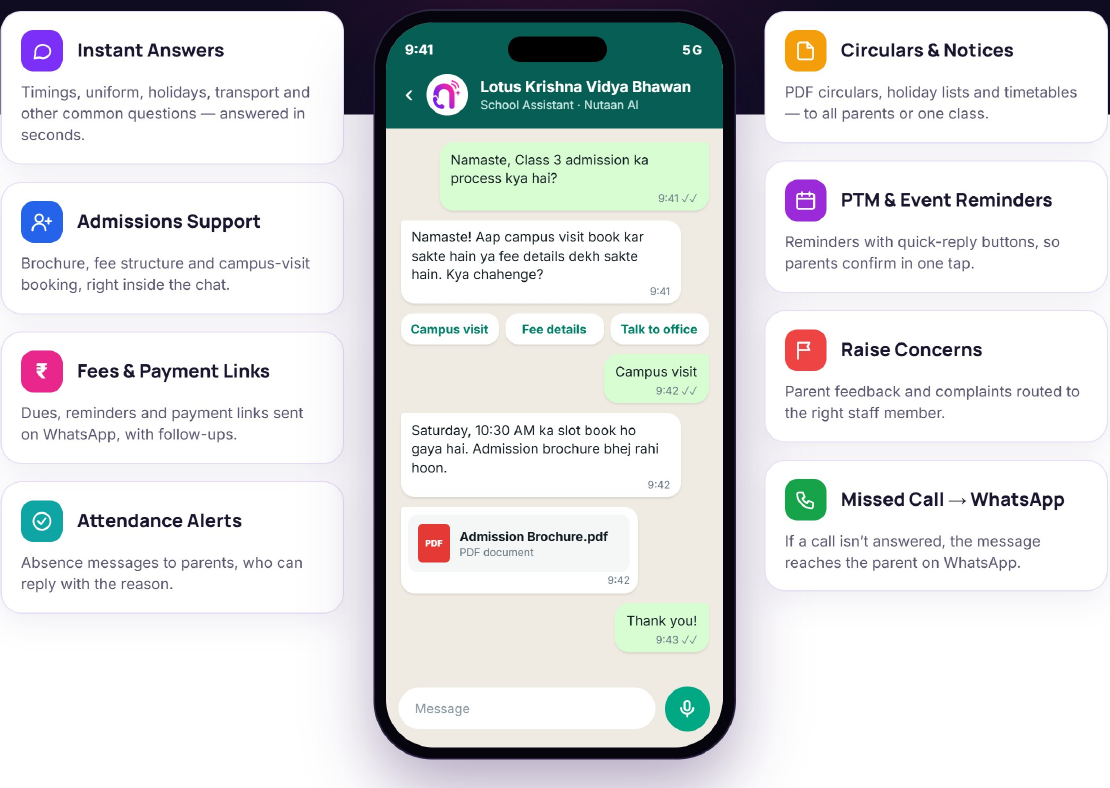
For example, a parent asking about Class 3 admission could receive the document checklist and brochure, then request an available visit slot. The admission team would receive a record of the enquiry rather than an unexplained name and phone number.
Eligibility exceptions and admission decisions should remain with authorised staff. The assistant's job is to make the enquiry easier to handle, not to decide who gets admitted.
2. Fee reminders with room for a human response
A fee reminder seems simple until a parent says, “We already paid,” or “Can someone from accounts call me?”
An automated reminder should use verified dues and an approved schedule. It can communicate the due date, share a payment link through the configured channel, and record a parent's response.
It also needs a stopping rule. A report of an incorrect amount or an already completed payment should go to accounts for verification. The system should not keep repeating the same demand while the issue remains unresolved.
A promise to pay on Friday is useful follow-up information, but it is not proof of payment. Schools should distinguish conversation outcomes from confirmed financial records.
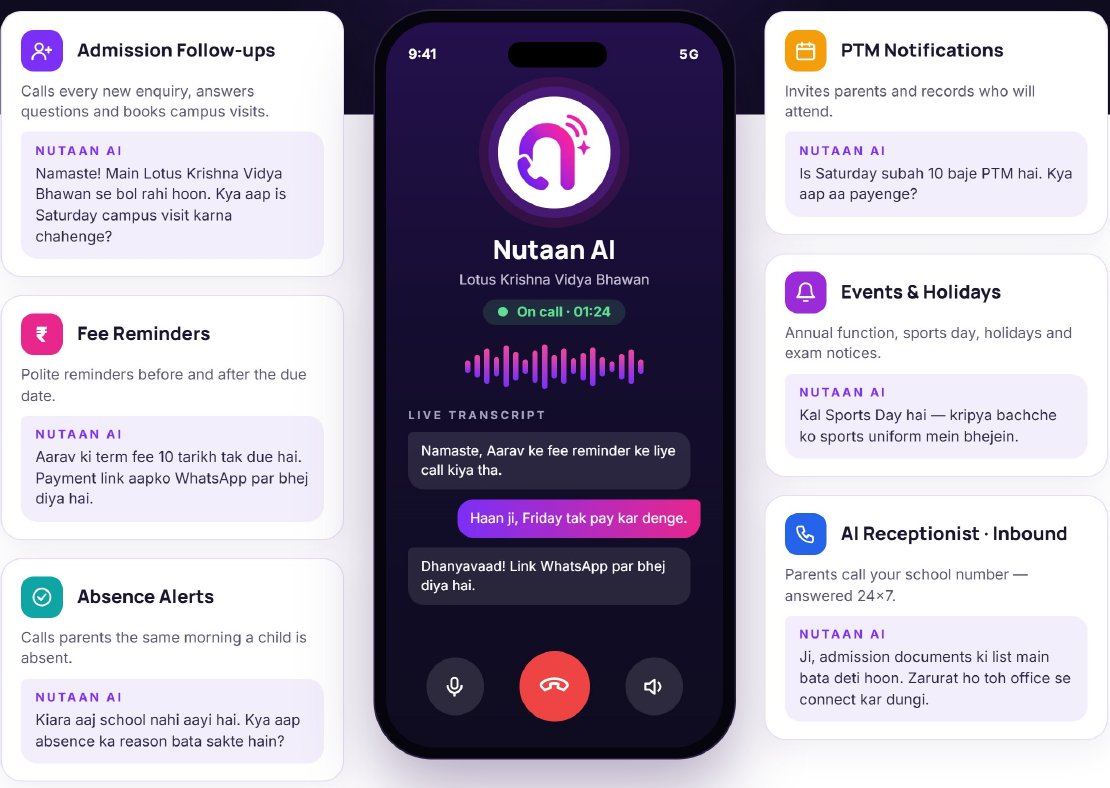
3. Absence alerts that support staff follow-up
An absence workflow begins with an accurate attendance record. If that starting point is wrong, faster communication simply spreads the error faster.
Once the school has confirmed an absence and the appropriate guardian contact, a configured call or message can notify the parent and capture a response. Staff can then review whether further follow-up is needed.
The message should stay factual: the student has been marked absent and the school is requesting confirmation. It should avoid assumptions about the reason.
Unreachable parents, disputed attendance records and concerns about a child's wellbeing require a defined staff response. An automated alert supports the school's process; it should never be treated as a complete safety system.
4. Parent-teacher meetings with useful confirmations
Inviting families to a parent-teacher meeting is only the first step. The office may also need to know who received the invitation, who confirmed, and who requested another time.
An AI calling workflow can communicate the approved meeting details and capture these responses. A configured WhatsApp message can provide a written reference that the parent can revisit.
The confirmation should be specific. “Received invitation,” “plans to attend,” and “requested a callback” mean different things. Recording them separately gives staff a more useful picture than a list of completed calls.
Rescheduling should follow the school's actual availability. If the assistant cannot access an approved slot, it should collect the request for staff rather than promise a time.
5. Routine WhatsApp conversations without endless repetition
Parents may prefer a message when they cannot answer a call. They also need information they can refer back to: a circular, document checklist, timetable or brochure.
WhatsApp automation for schools can be useful for these repeatable exchanges. An assistant can answer approved questions, share relevant documents and pass conversations to staff when needed.
The important design choice is how voice and messaging work together. If a reminder call goes unanswered, an authorised follow-up message can offer another route. If the parent replies with a question, the office needs to see that response in context.
The goal should be continuity, not simply contacting the same family through more channels.
Useful automation starts with school information
The most important preparation happens before the first automated call. A school needs to decide what the assistant is allowed to say and where that information comes from.
A practical starting set includes the current brochure, admission dates, document requirements, fee information, office hours, meeting schedules and frequently asked questions. Each item needs an owner who can confirm it is current.
Updating a brochure is not the end of the process. Staff should test the affected answers, retire conflicting information and check that dates and amounts are being communicated correctly.
Likewise, an absence alert or individual fee reminder needs an approved source of student-specific information. Schools should confirm how that information will be supplied or connected rather than assume an existing management system is automatically integrated.
Start with one workflow, then test the awkward cases
A school does not need to automate every conversation on day one. A narrower pilot, such as answering general admission questions, is easier to inspect and improve.
Define what a successful interaction looks like. It could be answering an approved question, sharing the right brochure and recording whether a parent wants a callback.
Then test the conversations that do not follow the script: a parent changes language, interrupts, gives incomplete information, disputes a reminder, or asks to speak with a person.
For Hindi-English communication, testing should include the way families actually speak, including mixed-language sentences, local place names and school-specific terms. A language listed as supported still needs to be assessed in the school's own context.
During a pilot, staff should review samples of conversations and unresolved cases. Expand the workflow only when the team understands both its useful outcomes and its failure points.
A practical pilot example
Consider a limited admission-enquiry pilot using only public school information. Prepare a question set covering application dates, required documents, transport questions and requests outside the assistant's scope. Include deliberately conflicting questions, such as asking for last year's fee when the current brochure gives a different amount.
For each interaction, staff can record the expected answer, the actual response, the source used and whether escalation happened correctly. A conversation that sounds friendly but gives an incorrect deadline should count as a failure. This is an evaluation method a school can adopt, not a claim about results already achieved by Nutaan.
Parent trust needs to be part of the design
A school assistant may handle information about families and children. That makes communication design as important as convenience.
Parents should understand when they are interacting with an automated assistant, how to reach a person, and what happens to information shared during the conversation. Recording practices and communication preferences should be explained clearly.
Schools should decide which staff can access recordings, transcripts and reports, what information is necessary for each task, and how long those records should be retained. These decisions need verification in the chosen setup; they should not be assumed from a product demonstration.
An unanswered question is better than a confident invented answer. Complaints, financial disputes and sensitive student matters should have an obvious route to a responsible member of staff.
UNESCO's guidance on generative AI in education emphasises a human-centred approach, privacy and institutional evaluation of tools. Although its scope extends beyond school-office communication, those principles provide useful questions for an administrative pilot: who remains accountable, what information is processed, and how will the school assess whether the tool is appropriate?
UNICEF's Guidance on AI and Children likewise identifies safety, children's privacy, transparency and accountability as core requirements. Applying these principles to a parent-facing assistant means checking the handling of information about children even when the person speaking to the system is an adult. Neither organisation's guidance is an endorsement of Nutaan or a certification of a particular deployment.
Measure resolved work, not just call volume
More calls do not automatically mean better parent communication. A useful pilot should examine whether enquiries reached the right next step, reminders used accurate information, and parents could get help when automation was insufficient.
Useful measures include response accuracy, unresolved conversations, staff corrections, successful handovers and parent feedback. For cost, include setup, calling usage, messaging charges and the staff time required to supervise the workflow.
The question is whether the school is spending less effort on routine coordination while keeping the quality of communication intact.
Where Nutaan AI fits
Nutaan AI presents voice and WhatsApp assistants for school communication, including admission follow-ups, configured reminders, document sharing and conversation records. Its school proposal illustrates Hindi and English interactions, with recordings, transcripts and reports supporting office review.
A school evaluating those capabilities should ask to see its own approved information used in a small demonstration. It should also confirm the required data connections, channel setup, handover process and reporting before deciding what to introduce.
Questions to answer before going live
Can we begin without connecting private student records?
A general admission-information pilot can be designed around public material, such as the prospectus, office hours and published application process. Personalised dues or attendance notifications need a different data setup. Keep those tasks separate until identity checks, authorised contacts and the required information sources have been agreed.
What should happen when the assistant does not know?
It should acknowledge the limit, avoid guessing and offer the configured staff route. Test this explicitly. An unanswered question is not resolved simply because a transcript exists; someone needs responsibility for reviewing the queue and responding within the school's stated service hours.
What happens if the service is unavailable?
Maintain an alternative contact route and a staff procedure for interrupted workflows. Confirm how failed calls, delayed messages and unsent notifications appear in reports. Test recovery before relying on reminders for time-sensitive tasks, and ensure retries do not produce duplicate messages or contradictory updates.
A more responsive office, with people still at the centre
The strongest case for AI in education is sometimes found outside the classroom: helping the office keep up with everyday questions and follow-ups.
An assistant can help make an enquiry easier to answer and a reminder easier to track. Staff still provide judgement, reassurance and the personal understanding that families expect from a school.
Start with a defined task, keep the information current, and make human help easy to reach. That is a more useful foundation than trying to automate everything at once.
To explore the workflows discussed here, visit Nutaan AI for education or watch the school communication demonstration.
Published by Nutaan AI. This AI-assisted guide draws on Nutaan product materials and linked UNESCO and UNICEF guidance. Workflows are illustrative, not independently verified customer outcomes. Updated 6 November 2026.