
Choose the workflow your store needs
Recovery calling needs a dedicated configured workflow. It does not switch on when you install the shopping assistant.
AI checkout recovery calls →
A dedicated configured calling workflow for eligible abandoned checkouts.
COD confirmation before dispatch →
Order intent, address checks, callbacks and fulfilment review.
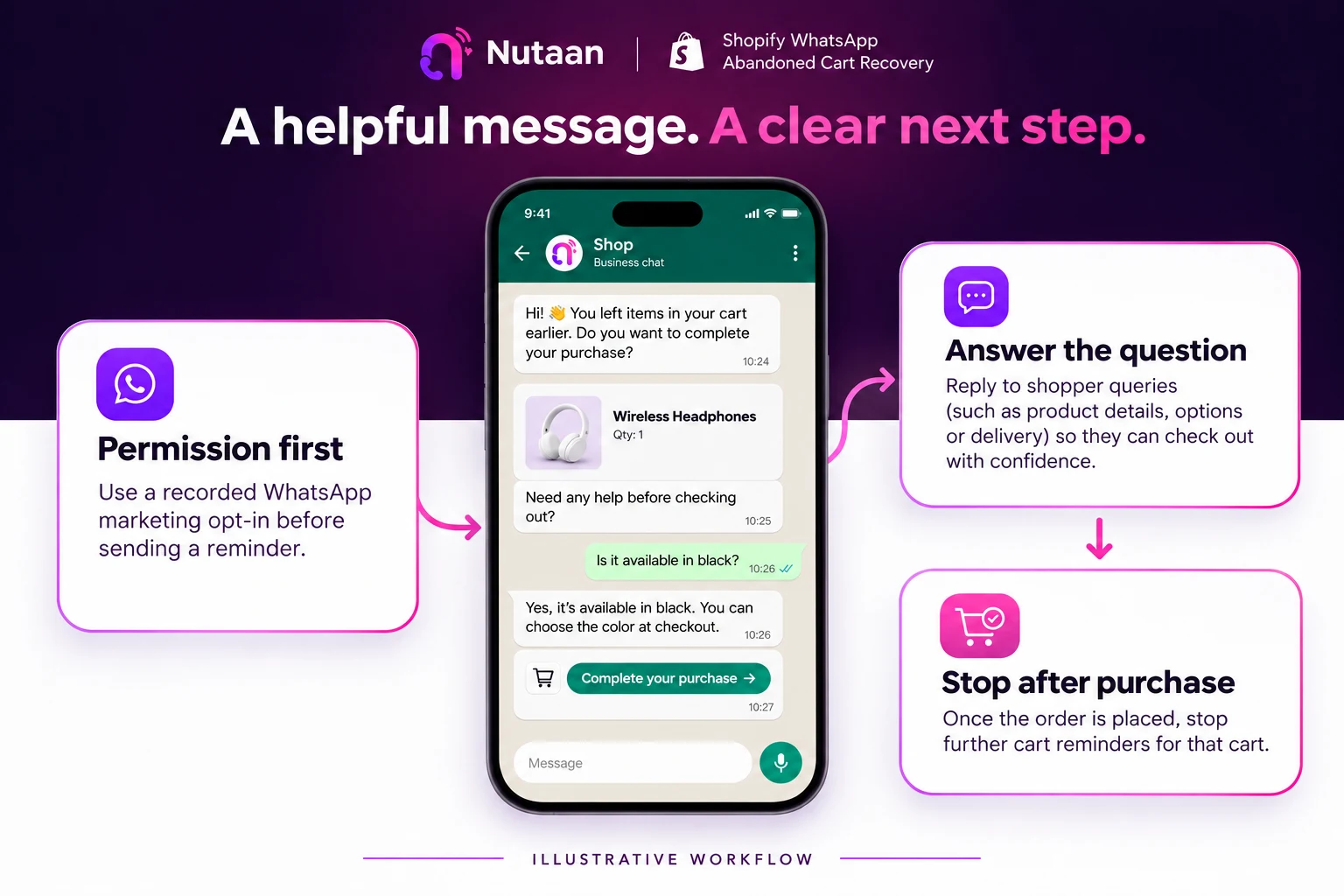
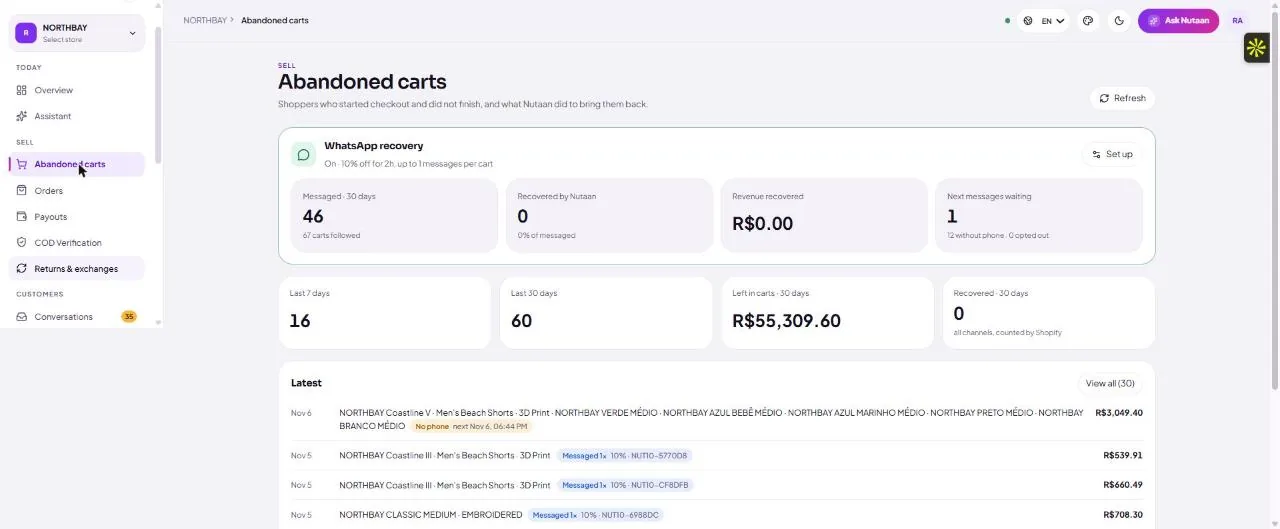
WhatsApp cart recovery →
Business setup, message intent, permission and replies.
Subscription and usage, shown separately
Growth · $500 USD / 30 days
Shopping assistant, catalogue and orders, abandoned-cart recovery and COD verification by email. Up to 2 Shopify stores per Commerce account. AI recovery/COD calling is not included in Growth.
Enterprise · $1,200 USD / 30 days
Growth features plus advanced WhatsApp automation and AI calling for cart recovery and COD verification. Up to 2 Shopify stores. Recurring Shopify subscription; approval is required before billing starts.
Calling and connected services · Confirm usage costs before launch
Ask for the applicable calling-minute rate, number rental, destination charges, email transport and any connected-service fees, including what your plan includes. Do not treat the subscription as unlimited calling or add a second charge for an item already included.
WhatsApp delivery and offers · Market and message category matter
WhatsApp Business Platform charges depend on delivered message category and recipient market; connected messaging services may have their own fees. Include discounts, tax and currency conversion in your budget. A cart reminder is marketing content, not an order-service update.
Both plans auto-renew after Shopify approval until cancelled. Existing contracted customers keep their agreed billing arrangement. Review current terms on the Shopify App Store.
Connect, configure, test—then launch
Connect the correct store and catalogue, prepare the calling or WhatsApp connection, agree permission and contact rules, then test purchases, opt-outs and support handoffs. Enable the storefront app embed separately in the theme editor.
- Choose eligible checkouts or unpaid COD orders; keep those journeys separate.
- Set the workflow owner, permitted contact hours, language, attempt limits and approved offers.
- Recheck purchases and opt-outs before contact; test suppression across connected tools.
- Review exceptions and address changes before fulfilment; do not treat a call as payment or guaranteed delivery.
🇺🇸 United States
Evaluate higher-value checkout recovery where contribution margin can cover a helpful conversation. Validate permission, permitted calling methods, contact hours and opt-outs before a pilot. A large cart alone does not make contact appropriate.
🇬🇧 United Kingdom
Start with selected high-margin brands and permission-ready pilots. Check the proposed email, WhatsApp and automated calling journey against applicable UK marketing rules before launch; checkout contact details alone are not a blanket permission.
🇮🇳 India
Prioritise qualified COD stores with a reachable checkout number, clear communication permissions, a fulfilment review process and enough order margin to justify contact. Keep abandoned-checkout recovery separate from post-order COD confirmation.
Plan the email, WhatsApp and calling sequence, review COD address checks and callbacks, and measure incremental recovery contribution.
From a product question to your checkout
A shopper asks about products, variants or sizing. The assistant answers from the catalogue your store publishes, recommends what fits and hands them to your own checkout. Stock counts appear only when your store supplies them.
Set up on Shopify
Conversations, support and orders
Review assistant conversations and support requests in the Commerce console. Signed order webhooks keep connected order records current. You control support status; the console does not email customers in your name.
See it before committing
Walk through the Nutaan Commerce product page to see the assistant and console. In a demo, test your own product questions and ask for setup, current price and support terms before going live.
Plan your deployment: UK, US and India
The same product, checked against how each market buys, speaks and connects its systems.
UK stores
Keep your existing Shopify or WooCommerce checkout, currency and store policies. Test UK product terminology, delivery questions and the handoff to your support team, and confirm support hours and data-processing arrangements in your proposal.
US stores
Test product variants, sizing, availability and checkout handoffs on your US store. Order and support workflows need their own signed-webhook setup; the public product connection does not expose private customer orders.
Indian stores
Commerce speaks Hindi and English — test mixed-language product questions on your own catalogue. For COD confirmations and delivery follow-ups by phone, pair it with Nutaan retail calling.
Frequently asked questions
Does Nutaan replace Shopify checkout?
No. The assistant guides the shopper to the checkout on your own store. Payment stays with your existing commerce platform.
Can it answer in different languages?
Commerce supports English, Portuguese, Spanish, French, German and Hindi. Test your own catalogue and product terminology before launch.
Can I use it for support?
The console brings conversations and consented support requests together. Private order information requires the appropriate store connection and access controls.
Will an AI assistant guarantee more sales?
No. Evaluate product-answer accuracy, shopper engagement, checkout handoffs and completed purchases against your existing baseline.
Compare the setup for WooCommerce, or explore AI calling for retail operations.